Using fixed fee billing, you can charge a predetermined, flat fee for services rather than billing by the hour. This approach is commonly used for work such as drafting contracts, estate planning, or certain litigation matters.
There are two ways to bill fixed fees in Actionstep:
- Set the matter up to have a fixed fee billing arrangement, enter a quoted amount and then choose whether to add this as a time entry or a total fee (described below and in Generating an Invoice Using Fixed Fee Billing).
- Add a time entry as a fixed fee (described in Generating an Invoice Using Fixed Fee Billing) .
To designate fixed fee billing at the matter level:
- In Actionstep, view the matter you want to set up the billing arrangement for. (See Editing a Matter for help.)
- Click the Billing menu icon. The Billing page appears.
- On the left side of the page, click Matter billing options. The page is updated to show Matter Billing Options.
- In the Billing arrangement section, click the Arrangement drop-down list and choose Fixed fee.
- In the Quoted/Estimate section, enter a quoted amount in the Quoted/Estimate amount field.
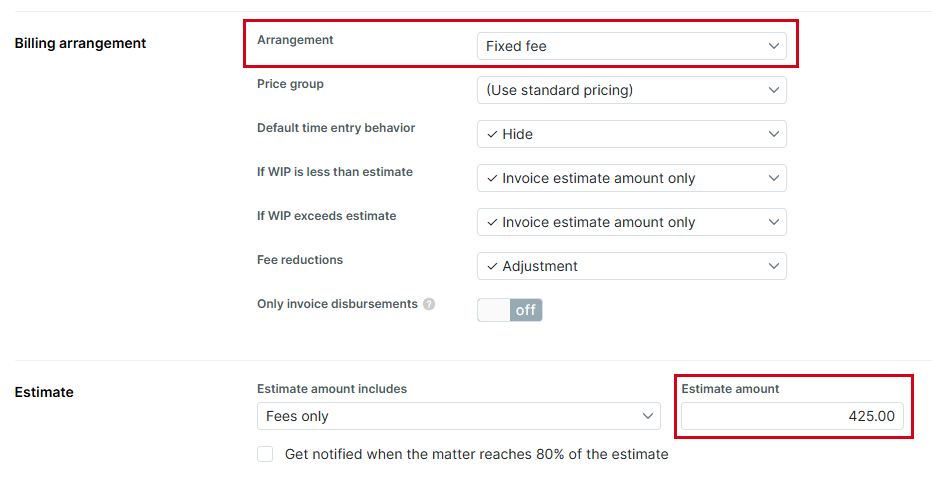
- Click Save to save your changes.
The Invoice Now button on Billing page now displays the quoted amount.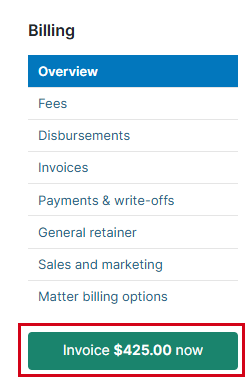
Regardless of fees and expenses, the matter will be billed at the quoted amount each time the matter is billed. The matter will keep this setting whether billed in the matter or the mass billing page.
Additional Resources:
Was this article helpful?
That’s Great!
Thank you for your feedback
Sorry! We couldn't be helpful
Thank you for your feedback
Feedback sent
We appreciate your effort and will try to fix the article